Print eight 35×45 photos on one 4×6 sheet
You need identical 35×45 mm prints and one cheap drugstore sheet with eight copies. Use the free maker on the homepage: pick a 35×45 mm size (United Kingdom, Schengen Area, Australia, or a matching visa), tap Continue to Crop & Adjust, then Crop Image, open Preview & Download, choose 6×4 / 15×10 cm — 8 photos, download, print at 100%, then cut two for the form. If your path only wants a digital upload, skip the sheet. Confirm how many prints to enclose on your country’s official photo page. Already have finished photos—or need different people on one sheet? Use the free print sheet composer instead of repeating one crop eight times.
See eight copies in the homepage tool
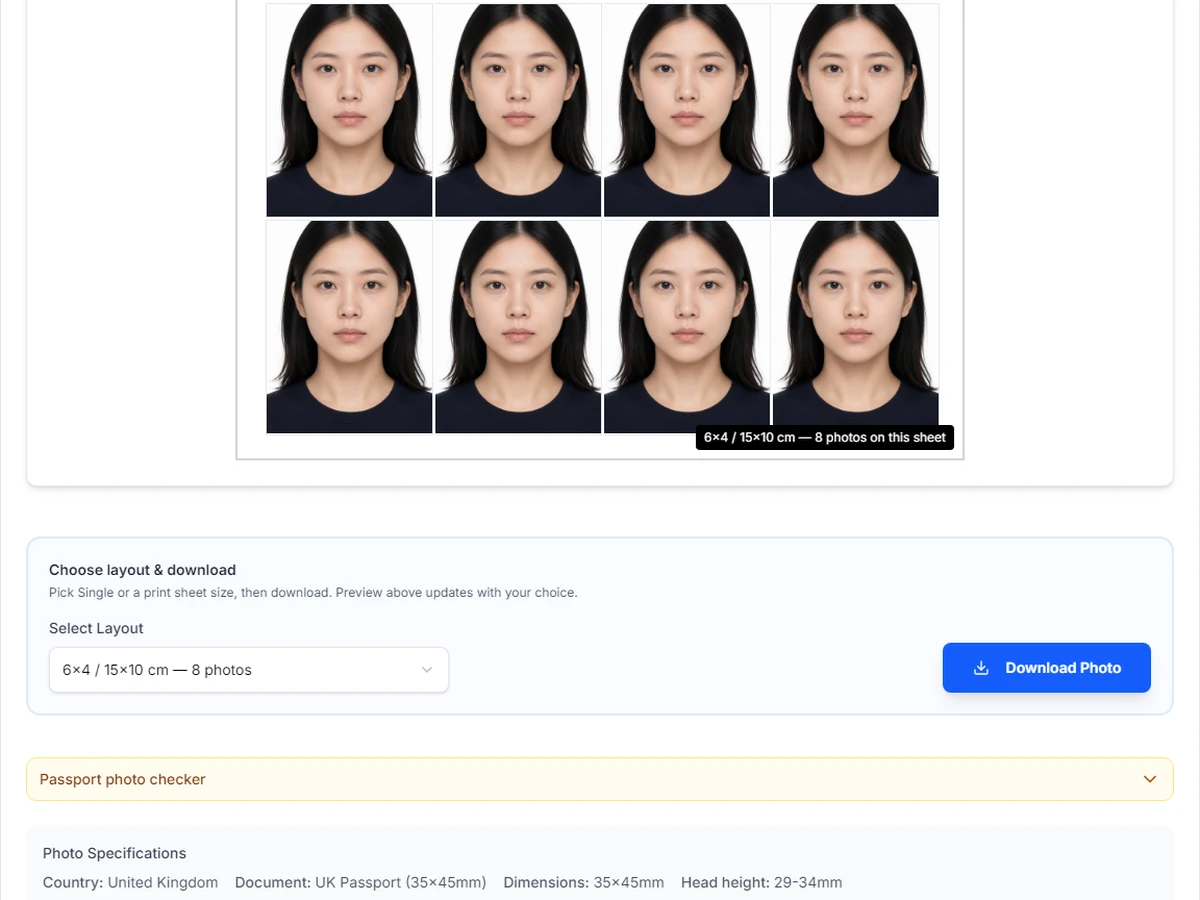
Open the free maker on the homepage. After you finish Crop Image, Preview & Download lets you pick a print sheet. Choose 6×4 / 15×10 cm so the menu shows 6×4 / 15×10 cm — 8 photos—four across, two down.
That preview is the file you take to a drugstore kiosk or home printer. Use Download Photo or Download Photo Sheet, print at 100% / actual size, then cut two identical 35×45 mm prints.
Need US 2×2 inch squares instead? On the homepage pick the United States template and a 4×6 layout (usually six squares). This guide walks the 35×45 → eight-copy path for one person. For a family layout with different faces, open the print sheet composer after each photo is cropped.
- Homepage → 35×45 mm (United Kingdom / Schengen Area / Australia)
- Crop Image → Preview & Download
- Select Layout: 6×4 / 15×10 cm — 8 photos
- Download Photo / Download Photo Sheet
- Print at 100%; cut two for the form
Start with Select & Upload
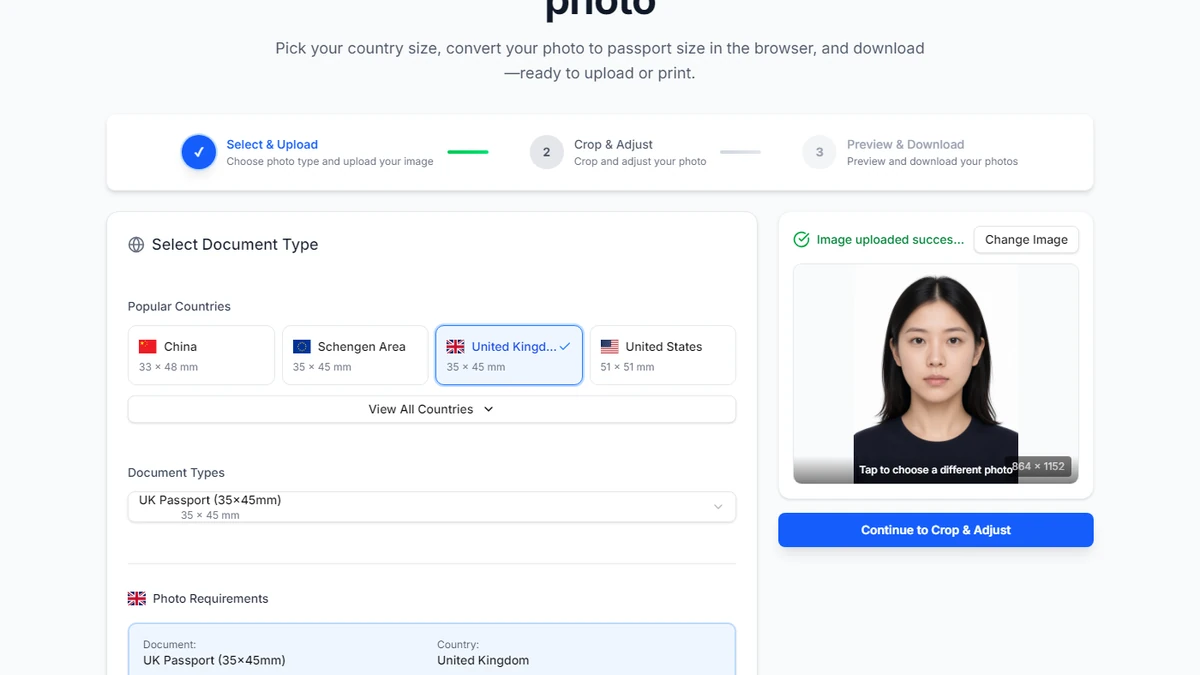
On the homepage, select United Kingdom, Schengen Area, Australia, or another 35×45 mm document. Upload a clear photo until you see “Image uploaded successfully”. Tap Continue to Crop & Adjust.
If you pick the wrong country size, the sheet count will be wrong. Confirm the requirements card shows 35×45 mm before you crop.
Home printers with margins can still shave outer copies after download. If a ruler shows short millimetres, reprint borderless at a kiosk.
- 35×45 mm document selected
- Status: Image uploaded successfully
- Continue to Crop & Adjust
- Later: measure one print before cutting the whole sheet
From Crop & Adjust to the eight-copy sheet
In Crop & Adjust, line up the face with the guides, then tap Crop Image. The next screen is Preview & Download—pick the multi-copy sheet there.
Open Select Layout and choose 6×4 / 15×10 cm (6×4 / 15×10 cm — 8 photos). You should also see 8 photos on this sheet. If you still see six, you are on portrait 4×6—switch to 6×4.
Download JPG for most kiosk apps. Use PDF at home if you want a locked page size. Name the file clearly so you do not upload the uncropped original by mistake.
- Crop Image
- Select Layout → 6×4 / 15×10 cm — 8 photos
- Download Photo Sheet
- Keep the uncropped master for a retry
Print at a kiosk or at home
At a kiosk: upload the sheet as a normal 4×6 / 6×4 / 4R photo print on matte or glossy paper, quantity one. Skip the full passport studio package unless you want staff to photograph you.
At home: load photo paper, set the driver to the same 4×6 or 6×4 size as the file, and choose 100% / actual size. Turn off fit-to-page.
Let the sheet dry before you stack or cut. Do not laminate. Do not write on the face of the photos.
- One 4×6 / 6×4 photo print of your sheet
- Photo paper + 100% scale
- Never fit-to-page
- Landscape file → landscape paper when the driver asks
Crop & Adjust: align once, then build the sheet
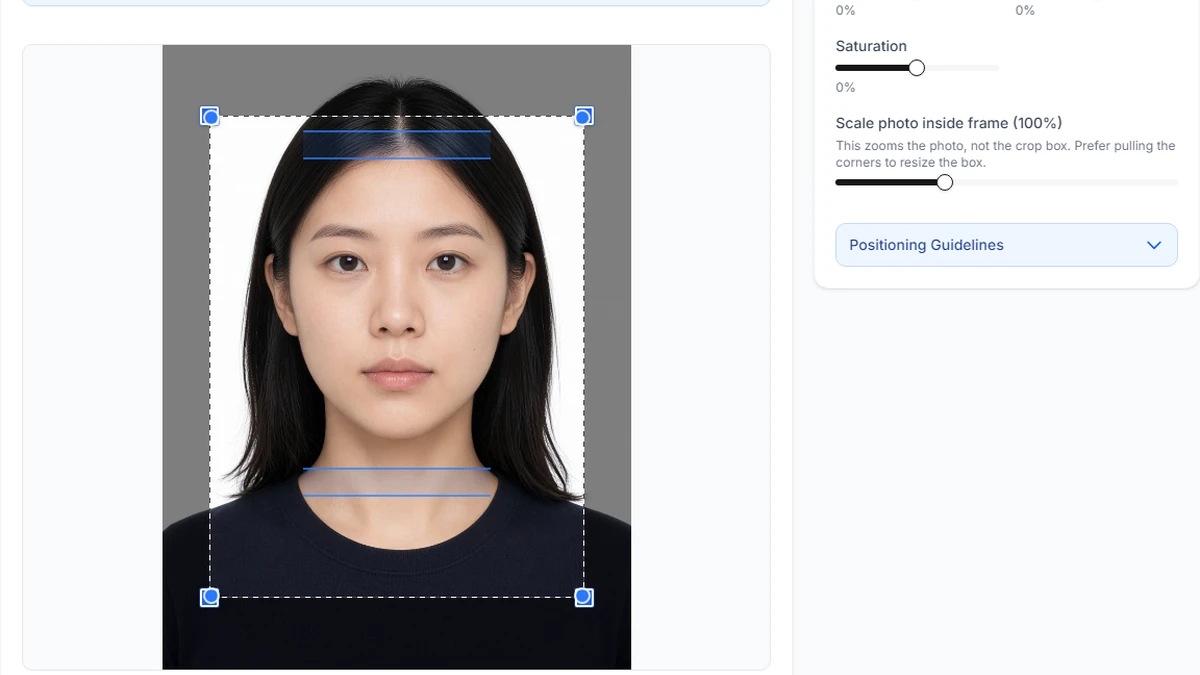
Pull the crop corners so chin-to-crown sits in the guides. Optional brightness tweaks are fine; do not add beauty filters.
After Crop Image, you are not done until you pick the 6×4 sheet and download. Single Photo is for digital uploads—not the eight-copy drugstore print.
When you cut paper prints, measure one rectangle: it must stay 35×45 mm. Hand in two identical copies when the form asks for two.
- Align guides → Crop Image
- Change Select Layout from Single Photo to 6×4
- Ruler-check 35×45 mm after printing
- Two identical finals when required
What this usually costs
One drugstore 4×6 / 6×4 print is usually a fraction of a walk-in passport counter package, and you walk away with eight cuttable copies.
That only works if the photo already meets the rules. Fix lighting and background before you spend on the sheet.
- Kiosk sheet print: usually far cheaper than a studio package
- Eight on the paper ≠ eight required on the form
- Digital-only application: skip printing
Fixes when the cut size is wrong
Fit-to-page and shrink-to-fit shrink every copy. Switch to actual size / 100% and reprint.
Portrait file on landscape paper—or a US 2×2 sheet when you needed 35×45—will fail a ruler check. Match the template and paper orientation to the file you downloaded.
Use photo paper for mail-in applications. Plain office paper looks dull even when the millimetres are right.
- Fit-to-page was on
- Wrong paper size or orientation in the driver
- Wrong country template
- Uploaded the uncropped phone original
- Cut before the ink dried
Skip this sheet when it does not help
US passport and many US visa forms need 2×2 inch squares. Do not hand in 35×45 rectangles from this sheet for those applications—use the United States template instead.
Online routes that ask for a JPEG upload do not need eight paper copies. Print only when the path requires prints or you want a physical spare.
Other millimetre sizes (for example China 33×48 mm) tile differently. Change the country template first so the preview count matches what you will cut. Mixing people on one drugstore sheet also belongs in the print sheet composer—keep one document size for the whole paper.
- US 2×2 → homepage United States template + 4×6
- Upload-only path → no sheet needed
- Different millimetres → change template first
Homepage eight-copy sheet vs print layout tool
This guide’s main path is one crop, eight identical copies: homepage → Crop Image → Preview & Download → 6×4 / 15×10 cm — 8 photos. That is the cheapest way to get two form prints plus spares of the same person.
Switch to the print sheet composer when you already have finished passport-size files, or when several people must share one sheet. Fill each slot separately; leave unused slots blank.
Do not mix US 2×2 with UK 35×45 on the same paper. On either tool, print at 100% / actual size and measure one cut rectangle before you hand anything in.
- Same person ×8 → homepage Preview & Download layout
- Different people / ready files → print sheet composer
- One document size per sheet; print at 100%
Ready to crop your photo?
Free online tool—pick your country template (US 2×2 or UK 35×45), align your head, and download. No account needed.
Need a print layout, not eight copies of one crop?
Use the free print sheet composer when photos are already sized—or when family members share one drugstore sheet. Same document size per sheet.