
UK passport photo size: 35×45 mm (not US 2×2)
UK passport photos are a 35 mm wide by 45 mm high rectangle—the size UK photo booths print—not the US 2×2 inch square. Head height, background colour, and how recent the photo must be also differ from American rules. This size guide walks through GOV.UK printed and digital requirements, how UK framing differs from a US crop, and how to measure before you upload or post an application. Always confirm the latest wording on gov.uk before you submit; third-party charts go stale.
Official UK print size and head height
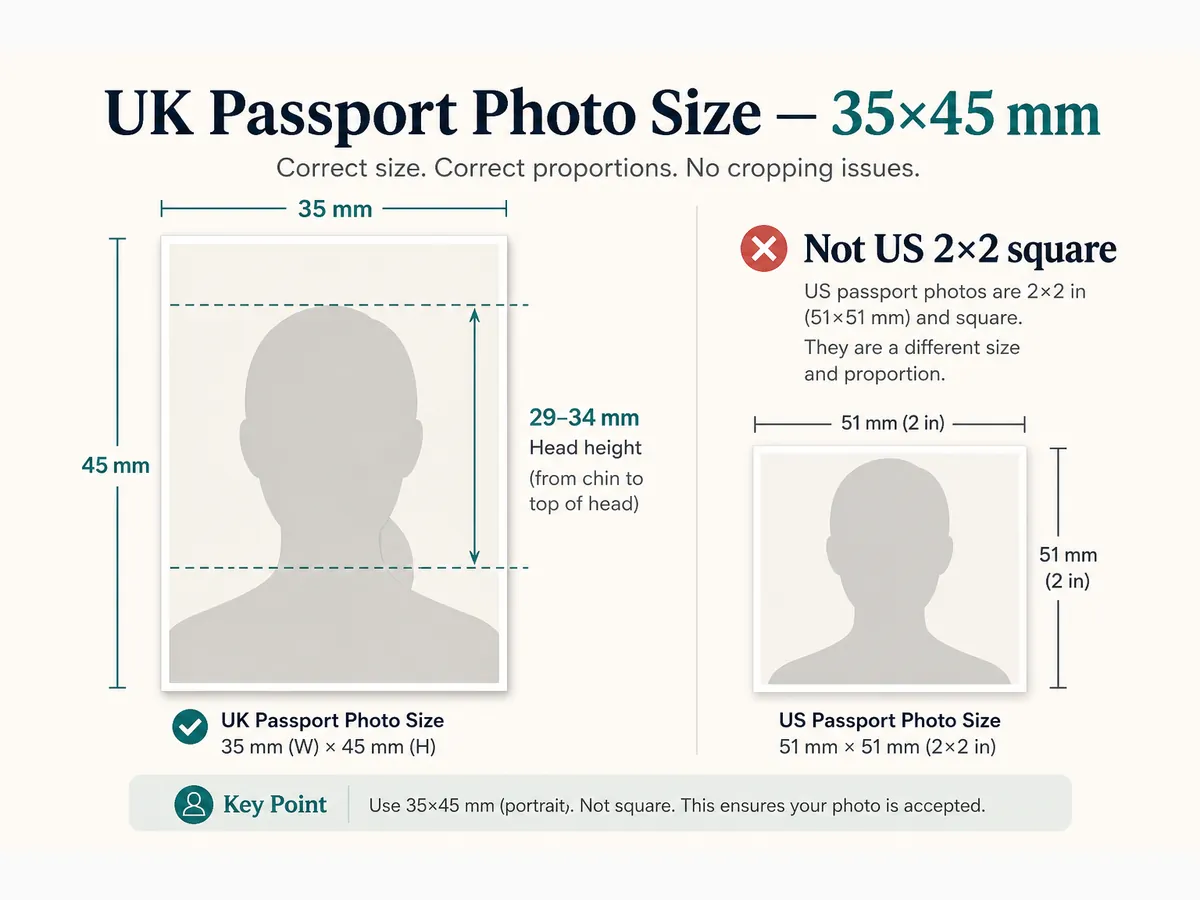
For paper applications, GOV.UK requires two identical printed photos measuring 45 mm high by 35 mm wide. That is the standard UK booth size. Do not cut a larger portrait down by hand and hope the head lands correctly—start from a correctly framed 35×45 crop.
On the print, the image of you from the crown of the head to the chin must measure between 29 mm and 34 mm. That millimetre band is what biometric scanning expects. Too little head and you look distant; too much and features get clipped when the photo is scanned.
Photos must be in colour, sharp, and a true likeness. GOV.UK guidance for printed photos asks for a photo taken in the last month for a new passport—confirm the current recency rule on the official photo pages when you apply.
- Print size: 35 mm wide × 45 mm high
- Head height (crown to chin): 29–34 mm on the print
- Two identical prints for paper forms
- Colour photo; not a cut-down larger picture
Printed photos for paper GOV.UK forms
Paper routes need professional-quality prints on photographic paper. Home inkjet prints are often not clear enough for facial biometrics. Guidance for photographers recommends medium/low-gloss or matt photo paper—not heavy cardboard or corrugated stock.
One of the two prints may need a countersignature on the back when your form requires it. The backing must allow ink without smearing. Protect prints from bends in the post; creases and wet ink cause avoidable delays.
If you use a booth outside the UK, check it can output true 45×35 mm UK size. Many overseas machines print US 2×2 or other ID sizes that fail British checks.
- Two identical 35×45 mm prints
- Photo-quality paper suitable for countersigning when required
- No lamination; no writing on the face of the photo
- Verify booth output is UK millimetre size, not US square
Digital photos for online GOV.UK applications
Online applications upload a digital file instead of posting prints. Digital rules still need a plain light-coloured background, balanced light, and a plain expression with mouth closed. You cannot “correct” a failed photo with heavy editing—unedited, filter-free images are required.
GOV.UK digital guidance commonly expects a minimum of about 600 pixels wide by 750 pixels tall, with a file size in a published kilobyte range (confirm current numbers on the passport service photo-rules page). Start from a sharp phone or camera original, then crop to 35:45 proportions.
Automated online checks look at face position, background, and quality. A photo that looks fine in your gallery can still fail if the face fills too much of the frame, the background is textured, or shadows sit behind the head.
- Plain light background without pattern or objects
- Balanced light—no shadows on face or behind you
- Enough pixels and file size for the online form
- No filters, beauty modes, or AI background swaps
UK 35×45 vs US 2×2 — do not reuse a US crop
US passport photos are a 2×2 inch (about 51×51 mm) square with a white or off-white background and a different chin-to-crown inch range. UK photos are taller than wide. Stretching a US square into a UK rectangle warps the face and fails review.
Background tone also differs. US guidance emphasises white or off-white. UK printed guidance points to plain light grey or cream (often described as about 5–10% grey). A bright US-style pure white wall can look wrong for UK prints even when the millimetres are correct.
If you already have a US renewal file, shoot again for UK framing—or crop a fresh wider portrait with UK head guides. Never submit the same square file to GOV.UK and travel.state.gov.
- UK: 35×45 mm rectangle; US: 2×2 inch square
- UK head band: 29–34 mm; US: about 1–1⅜ inches on the print
- UK print background: cream or light grey; US: white or off-white
- Separate crops for each country’s application
Background colour and lighting at UK size
Printed UK photos should sit on a plain, uniform light grey or cream background with no shadows. Digital uploads need a plain light-coloured background without texture. Busy wallpaper, plants, or a bright window behind you are common fail reasons.
Stand a short distance from the wall so your head does not cast a silhouette. Soft daylight facing a window—or two lamps at face height—beats a single overhead ceiling light. Uniform lighting matters as much as the millimetre crop.
Wear a top that contrasts slightly with a light background. Pure white on cream can flatten the shoulder line in a tight 35×45 crop.
Face, expression, glasses, and head coverings
Face the camera squarely with a neutral expression and mouth closed. Eyes open and clearly visible; no hair across the eyes. Shoulders squared so both edges of the face show. Do not tilt the head or look over one shoulder.
Glasses must not hide the eyes or show flash reflections. Hats and head coverings are not allowed except for religious or medical reasons when the full face from chin to forehead stays visible.
Include the head and upper shoulders in frame. Leave enough space so crown-to-chin height lands in the 29–34 mm band after you crop to 35×45.
Cropping a phone photo to 35×45 mm
Shoot with the rear camera at eye level, then crop to a 35:45 aspect ratio with head guides. Freehand zoom in a generic editor often drifts. Our free browser tool can apply a UK template on your device before you download.
Cropping cannot fix a soft original, a selfie angle, or a patterned wall. If the source fails lighting or focus, retake first. After cropping, check at 100% zoom for shadows behind the head and soft edges around the jaw.
For online upload, export JPEG (or the format the form accepts) within published size limits. For paper routes, print two identical copies at true millimetre size—print at 100% scale, not “fit to page.”
- Lock 35:45 aspect; do not stretch a US square
- Align crown-to-chin inside the 29–34 mm guide
- Retake soft or shadow-heavy originals
- Print at actual size when making paper photos
Common UK size mistakes
Size errors often travel with lighting errors. A perfect 35×45 crop of a shadowed wall still fails. Fix the setup, then measure.
- Submitting a US 2×2 square for a UK passport
- Head height outside 29–34 mm on the print
- Bright white US-style background when cream/light grey is expected for prints
- Cutting a larger photo by hand without measuring the head
- Uploading a filtered or AI-edited digital file
- Overseas booth that only prints non-UK sizes
Pre-submit UK size checklist
If any item fails, retake or re-crop before you post or upload. Fixing a rejected UK photo usually costs more calendar time than one careful measurement pass.
- Outer size is 35×45 mm (prints) or correct 35:45 proportions (digital)
- Crown-to-chin in the 29–34 mm band on prints
- Plain cream/light grey (prints) or plain light digital background
- Neutral expression, eyes visible, no heavy edits
- Photo recent enough for GOV.UK rules for your form
- You re-checked gov.uk photo requirements before paying fees
Ready to crop your photo?
Free online tool—pick your country template (US 2×2 or UK 35×45), align your head, and download. No account needed.