Take a Japan passport (旅券) photo at home
You can take a Japanese passport photo at home when size, background, lighting, and expression meet the published checklist—often 35×45 mm. Booths are convenient, not required. Most failures come from shadows, busy walls, selfie angles, or reusing a résumé 30×40 crop. Use this guide for a practical smartphone session, then crop free in the browser. Confirm current rules on the Ministry of Foreign Affairs passport pages before you apply.
What you need
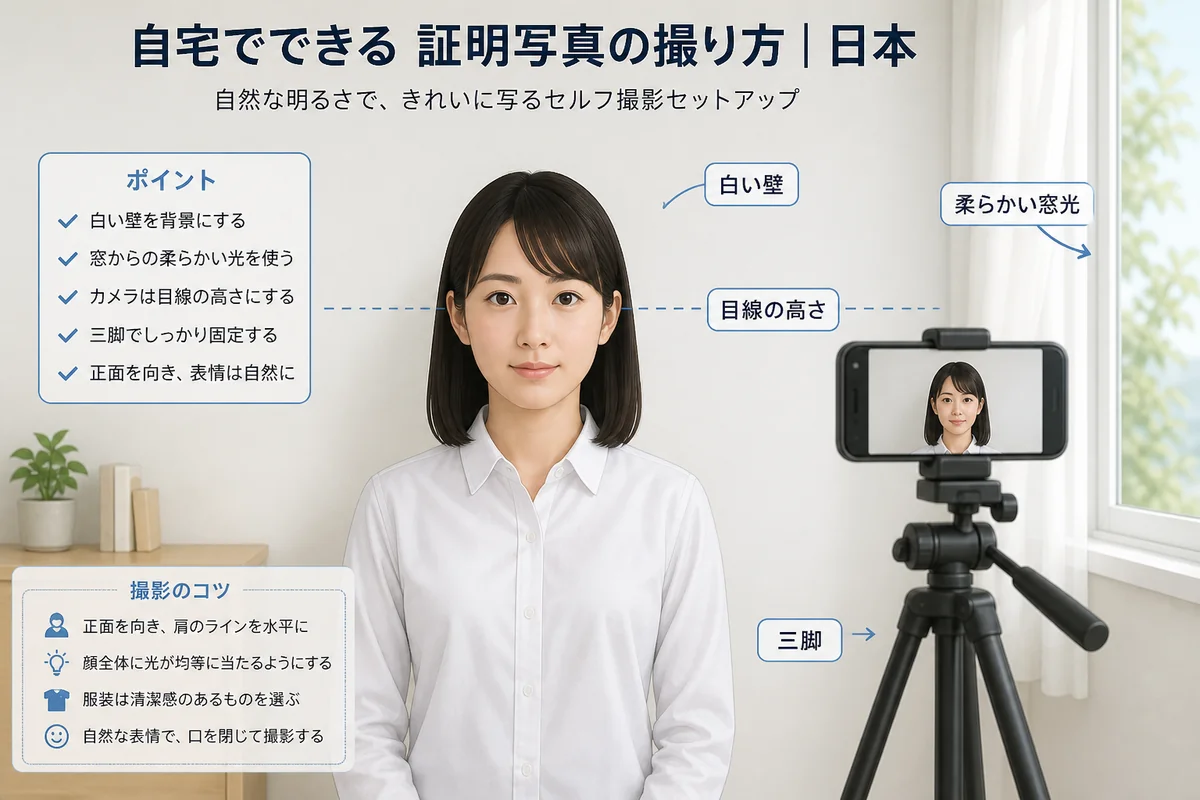
A modern smartphone is enough. Prefer the rear camera. Use a plain light wall or a wrinkle-free white sheet. Ask a helper or use a tripod and timer—front-camera selfies often tilt the face.
Wear a solid top that contrasts with the wall. Keep the session practical: you need a clear likeness for a 旅券 application, not a fashion portrait.
Clear shelves and posters from the background. Patterned wallpaper is a common reason photos get rejected.
- Plain light wall or flat white sheet
- Daylight facing a window, or two lamps at face height
- Solid clothing that contrasts with the background
- Helper or tripod so the camera stays at eye level
- A few feet of space from the wall
Lighting that passes review
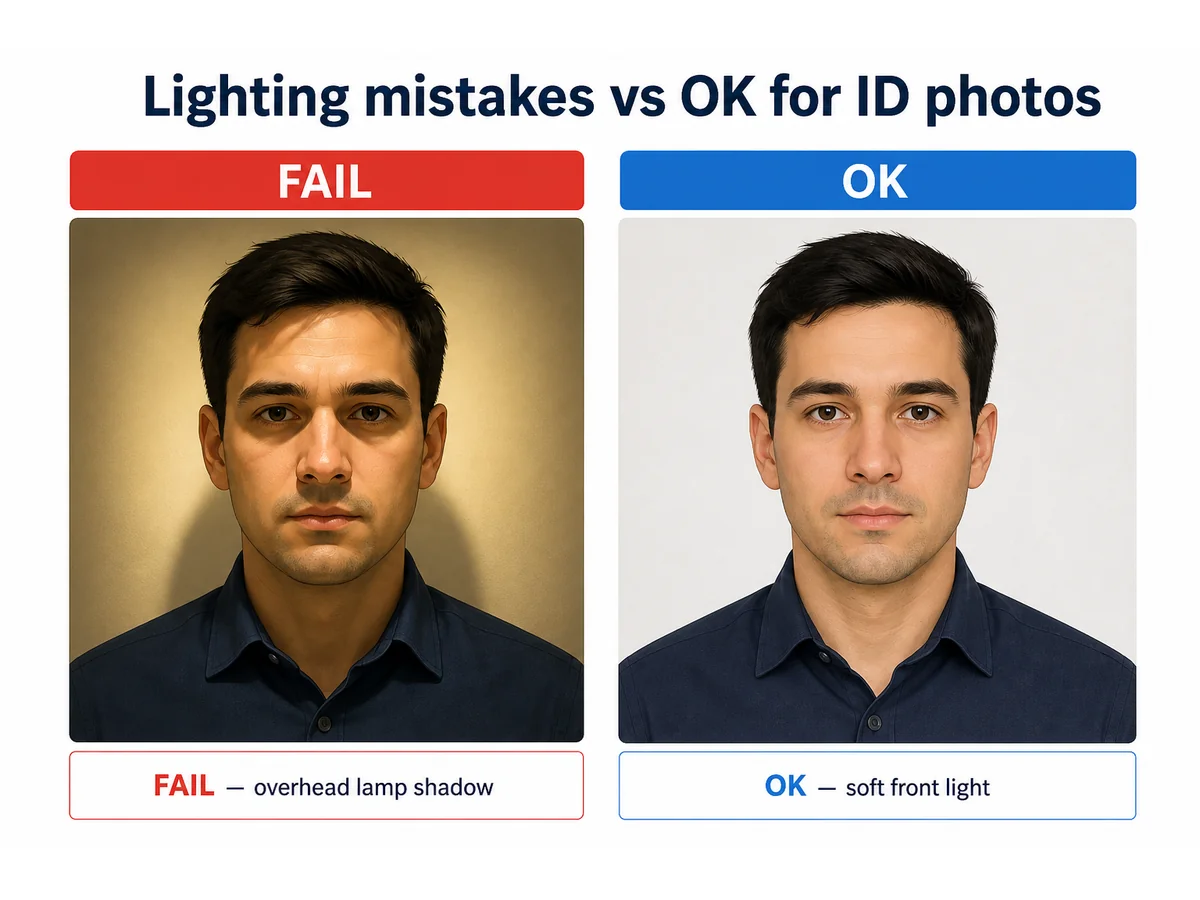
Soft daylight in front of you is the easiest option. Two matched lamps at face height also work. Avoid overhead-only ceiling light that shadows the chin and wall.
Do not stand with a bright window behind you—it silhouettes the face. Turn off beauty modes that reshape facial features.
If you use flash, diffuse it and check for glasses glare. Natural skin tone matters more than “bright enough.”
- Soft front light; no hard chin shadow
- Plain background under the same light
- No strong colour cast from coloured bulbs
- Beauty mode off
Distance, height, and framing
Stand about an arm’s length to a few feet from the wall. Keep the camera at eye height—looking down shortens the face.
Leave space above the head for a 35×45 crop. Take a burst and pick the sharpest frame with both eyes open.
Clean the lens. Prefer rear camera over front selfie distortion.
- Camera at eye level
- Space above the head for cropping
- Rear camera + timer/helper
- Several frames to choose from
Pose, expression, glasses, clothing
Face the camera straight on. Neutral expression, mouth closed, eyes open. Move hair off the eyes.
Remove hats unless an allowed exception applies and the full face remains visible. Avoid tinted lenses and glare.
Solid colours that contrast with a light wall work better than white-on-white.
- Neutral expression; mouth closed
- No filters or face-altering apps
- Eyes clearly visible
- Clothing contrasts with the background
Crop to 35×45 mm (not résumé 30×40)
Japanese passport photos commonly use 35×45 mm. Résumé photos are often 30×40 mm—do not stretch one into the other. Use our free browser cropper with the Japan passport template.
Check head height against the official diagram. Export a sharp JPEG for online filing when required.
For paper applications, print on quality photo paper. Keep the uncropped original.
Common home mistakes
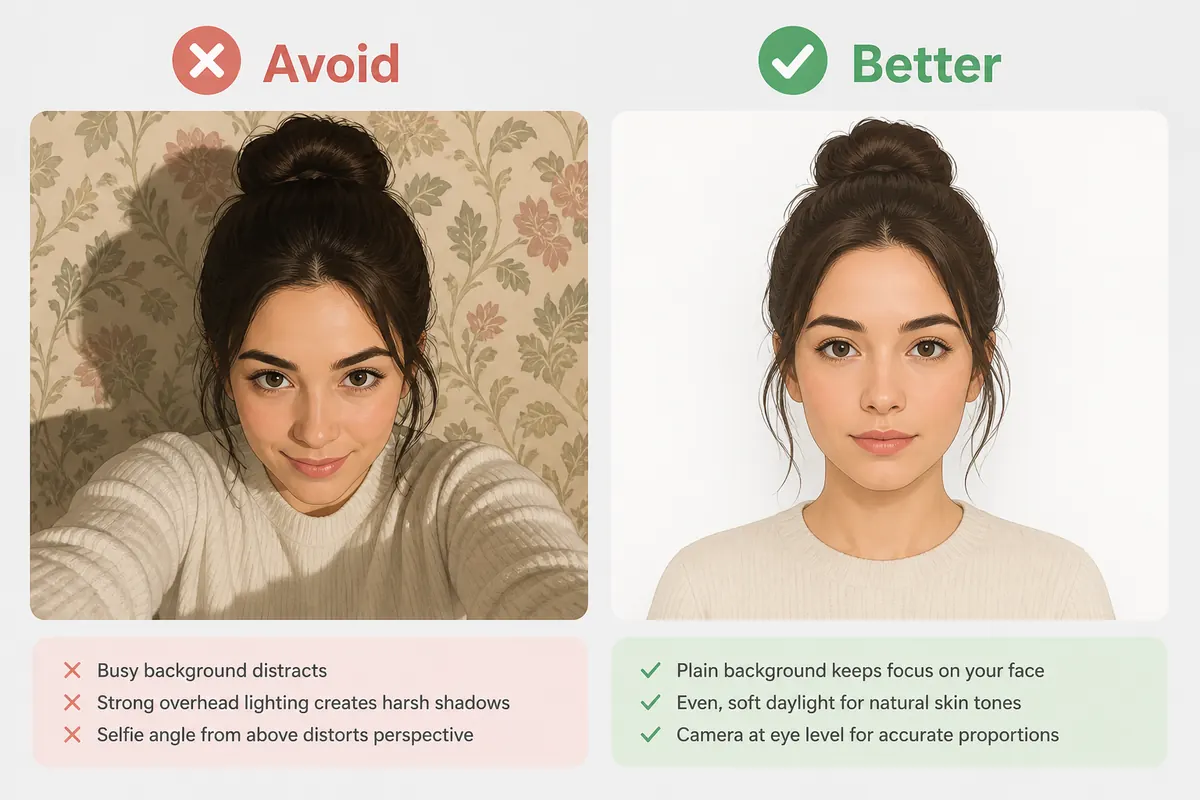
Frequent issues: patterned walls, overhead shadows, selfie angles, and wrong millimetres reused from a 履歴書 crop.
Heavy beauty filters that change face shape are another trap. Adjust exposure lightly if needed—do not reshape the face.
- Busy or dark background
- Shadow behind the head
- Wrong size (30×40 vs 35×45)
- Glasses glare
- Selfie distortion
- Beauty filters
A practical 15-minute order
Clear background → light → eye-level shots → pick frame → crop 35×45 → checklist.
- Minutes 1–3: clear wall; change clothes
- Minutes 4–6: set soft front light
- Minutes 7–10: shoot a burst
- Minutes 11–15: crop and checklist
Checklist before you submit
If any item fails, retake before you pay fees or book an appointment.
- Recent likeness (often within six months)
- Plain light background; even light
- No heavy shadows
- Neutral expression; eyes open
- Correct 35×45 crop
- No filters; JPEG ready if required
- You rechecked MOFA / portal instructions
Booth vs home
証明写真機 booths are fast. Home photos save a trip when you control light and framing. Both can pass when rules are met.
For online applications, a clean digital file matters as much as the print. Keep both when unsure.
Ready to crop your photo?
Free online tool—pick your country template (US 2×2 or UK 35×45), align your head, and download. No account needed.