Look over your passport photo before you hit submit
You already have a photo. Before you upload it, print it, or drop it in an envelope, spend a few minutes looking at it the way a reviewer would: Is the square the right size? Is the wall plain and even? Is the light flat across your face? Are your eyes clear, with no tilt and no filters? This walkthrough follows that order for a typical US passport photo (2x2 inches), calls out where UK and other sizes diverge, and helps you decide whether to re-crop or retake. Confirm the live wording on travel.state.gov for your form—pixel limits and rules can change.
What you are looking for
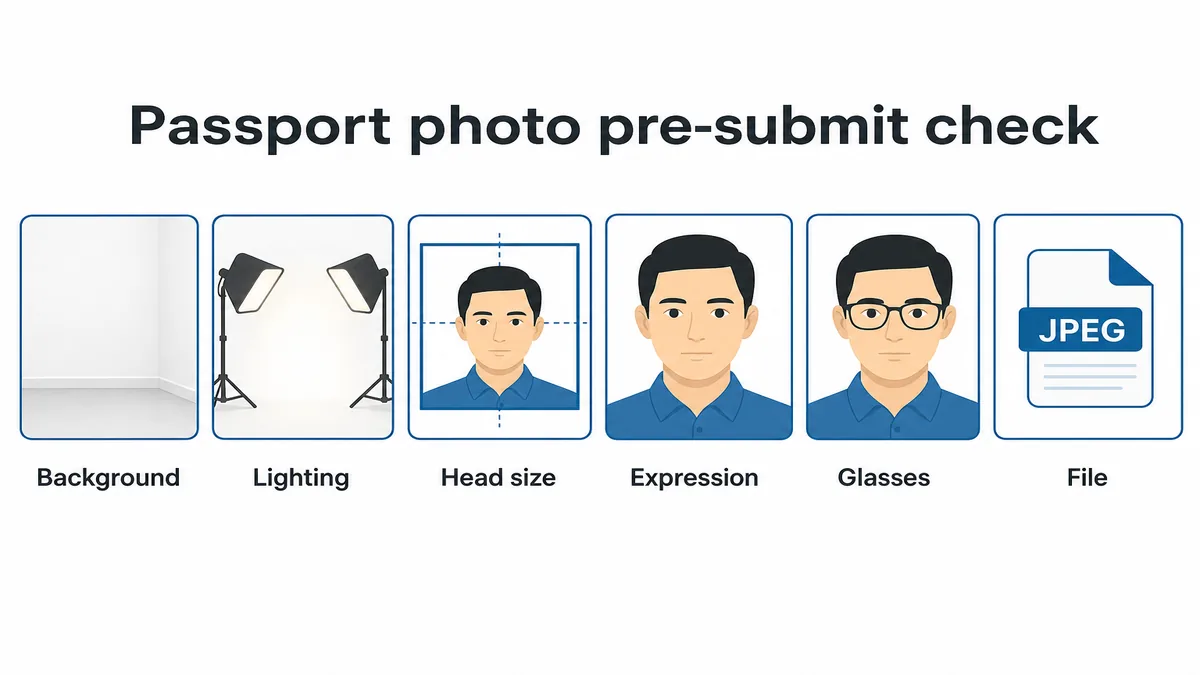
Official sites publish requirements and sample photos. The US Department of State does this for US passports; GOV.UK has its own path for UK digital photos. Those pages are the rulebook. A browser cropper—including the one on this site—mainly helps you line up the outer frame and head-height guides. It will not catch a busy wall, a chin shadow, or a beauty filter for you.
Open the photo large enough to see detail. Compare it with the official examples. If the light or background is wrong, retake. Do not paste on a fake white wall in an editing app and hope it slips through.
The steps below use the common US 2×2 inch layout. If you need UK 35×45 mm or Australian sizes, keep the same lighting and expression checks, but pick that country’s template before you download.
- Outer size matches the document (US: 2×2 in square)
- Head height sits in the published chin-to-crown band
- Background is plain white or off-white with even light
- Face is sharp, eyes open, expression neutral
- No beauty filters, face reshape, or AI background swap
- File type and size fit the online form if you renew digitally
- Sharp focus at full zoom—not soft, grainy, or over-compressed
- Clothing that does not disappear into a white wall
Size, head height, and whether your head sits straight
For a US passport photo, the print or digital image must be a 2x2 inch square. Inside that square, the head (chin to top of hair) is usually expected between about 1 and 1 3/8 inches—roughly half to a little more than two-thirds of the frame height. Too much empty forehead space or a crop that chops the crown both look wrong even when the outer square is correct.
Zoom until you can see pixels, then ask: are the sides of the face visible? Is there a little space above the hair? Is the head level—no tilt left or right, no chin tipped up or down? Did you stretch a non-square photo into a square? Stretching faces is a quiet reject reason—crop from a larger original instead.
Stand a few feet from the wall when you shoot. Too close and sheet wrinkles or wall texture show; too far and the head becomes tiny after crop. Keep the camera at eye level and your head centered in the frame.
If the head size or centering is wrong but the wall and lighting look good, re-crop from the master file. If the face is soft, shadowed, tilted, or distorted from a selfie angle, retake—no cropper fixes that.
- Confirm 2x2 (or your country's millimetre size) without stretching
- Chin-to-crown inside the published band (about 1–1 3/8 in for US prints)
- Head level and centered—no tilt
- A few feet from the wall; camera at eye height
- Keep an uncropped master so you can try again
Background, light, and clothes that blend into the wall
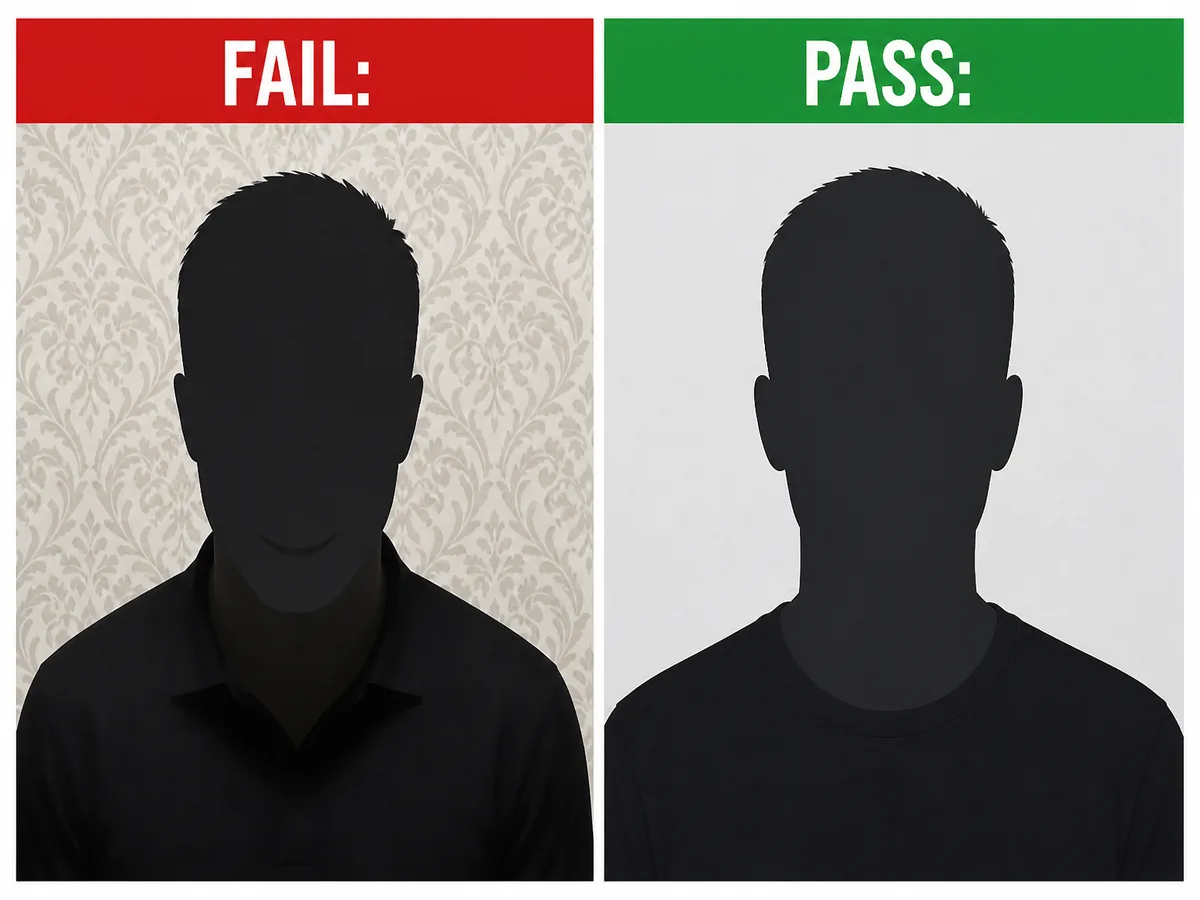
Reviewers want a plain white or off-white background with no pattern, texture, other people, or soft color gradients. Cream paint, wood paneling, curtains, and hanging plants all read as busy—even when they look fine on a phone lock screen. The wall should look evenly lit, not brighter on one side.
Lighting must be even across the face and the wall. Overhead-only ceiling lights carve a shadow under the chin and often a dark oval behind the head. A bright window behind you silhouettes the face. Soft window light in front of you, or two matched lamps at face height, is the home setup that usually works.
Watch for bright spots on the forehead, odd color from colored bulbs, and flash glare. Skip beauty modes that reshape the face.
Wear a solid top that contrasts with a white wall. A white or very light shirt often disappears into the background and makes the shoulders hard to read. Navy, charcoal, or another mid-to-dark color is safer for US-style white backgrounds.
- Plain white / off-white wall or a flat white sheet
- No shadow under the chin or behind the head
- Face and wall lit evenly—no silhouette
- Natural skin tone; no heavy beauty mode
- Clothing contrasts with the background
Face, expression, glasses, hair, and edits that get you rejected
Face the camera straight on. Mouth closed, neutral expression. Both eyes open and clearly visible. Pull hair off the eyebrows and eyes. Shoulders square so both sides of the face show.
Smiles with teeth, winks, head tilts, and Portrait-mode background blur are common DIY fails. Hats and head coverings are usually not allowed unless you have an accepted religious or medical reason and the face stays fully visible from chin to forehead—confirm on the official page for your case.
For US passport photos, eyeglasses are generally not allowed unless you have a signed medical exemption the agency accepts. Do not rely on avoiding glare alone—if current State Department guidance says no glasses for your form, take them off and shoot again.
Filters that slim the jaw, smooth skin into plastic, or replace the wall with a generated backdrop are not a shortcut. Official US guidance asks for the original, unchanged photo—no phone filters, editing apps, or AI alterations. A small brightness tweak on an otherwise good photo is different from reshaping your face.
- Neutral expression, mouth closed, eyes open
- No headphones, props, or other people in frame
- Hair clear of eyes and eyebrows
- No glasses for typical US passport photos unless exempted
- No beauty filters, face reshape, or AI background
Digital files and prints: numbers worth checking
Online US renewal adds file rules on top of the same visual standards. Forms commonly expect a recent color square in roughly the 600x600 to 1200x1200 pixel range, a file size inside the published minimum and maximum (often cited around 54 KB to 10 MB for passport renewal uploads), and a sharp image when you zoom to 100%. A tiny, over-compressed square that fits the byte limit can still look mushy around the eyes.
Prefer JPEG when the form asks for it. Convert HEIC from iPhone Camera first if the upload rejects it. Export once from the cropper or Photos—avoid screenshots of screenshots and chat-app recompression chains that soften facial detail.
For paper applications, print on matte or glossy photo paper at a true 2x2 inches—usually two identical copies. Do not submit photocopies, low-quality scans of prints, photos with red-eye, or creased/damaged paper. Measure a cut print with a ruler if you trim a sheet yourself.
Run the same visual checks on the file you send to a drugstore kiosk so the print matches what you already approved on screen. Pixel and file-size numbers above are typical for US online renewal—always match the live form text if it differs.
- Square crop; common digital range about 600–1200 px per side
- File size inside the form's published min/max
- Sharp at 100% zoom—no mushy recompression
- Photo paper for prints—not a photocopy or crumpled scan
- No red-eye; no holes, creases, or smudges on the print
US vs UK (and others): size—and sometimes the wall color
Lighting, expression, and no filters travel well across countries. Outer size does not. US passport photos are a 2x2 inch square; UK adult passport photos are typically 35x45 mm with a different head-height band; Australia follows Australian Passport Office millimetre guidance. Using a US square for a UK online application is a predictable fail.
Background color can differ too. US guidance centers on white or off-white. UK digital and print guidance often expects a light grey or cream wall—not the same pure-white look many US DIY shots use. If you are filing in the UK, check GOV.UK examples before you assume a US-style white sheet is fine.
Once the photo looks right, change only the size template: choose the country, align the head guides again, and export. Do not stretch one country's crop into another.
Country size pages and home-shoot guides are linked below. Use those for millimetre details, then come back here for the final look-over.
- US: 2x2 in square, white/off-white background
- UK: 35x45 mm; often light grey/cream—confirm on GOV.UK
- AU: APO millimetre ranges—not a US reprint
- Never stretch between templates
A five-minute order that works
Go top to bottom so you do not polish a photo that already fails on the wall. A retake before you pay is cheaper than a reject later.
If steps 1–4 fail, retake. If only step 5 fails, re-crop from the master. If only step 6 fails, re-export or reprint without crushing quality.
- Step 1 — Background: plain, even, no pattern, no other people
- Step 2 — Light: even face and wall; no chin/head shadow
- Step 3 — Pose: eye level, head straight, neutral face, hair clear, glasses per rules
- Step 4 — Clothes: solid color that contrasts with the wall
- Step 5 — Crop: correct country size; head height in band; no stretch
- Step 6 — File or print: pixels/size limits, sharp zoom, photo paper if printing
- Step 7 — Official page: re-skim travel.state.gov (or your country's site) for your form
Final pre-submit checklist
When every box passes, crop and download a clean copy, then submit. If anything is borderline, one more take usually costs less time than a rejected renewal.
- Taken within the last six months and looks like you now
- Plain white or off-white background under even light
- No shadow under the chin or behind the head
- Neutral expression; both eyes open; hair clear of eyes
- Head level and centered; no tilt
- Correct size template with head height in range
- No filters, face reshape, fake background, or (for typical US) glasses
- Clothing contrasts with the background
- Digital: square pixels and file size match the live form (if renewing online)
- Print: photo paper, true 2x2, no photocopy damage (if mailing)
- You rechecked the official photo page for your application type
What cropping can and cannot fix
Cropping helps after you already have a sharp, evenly lit photo: it puts the country frame and head guides on your screen so you are not guessing sizes on a phone. It cannot invent a plain wall, erase overhead shadows, or approve your application.
Crop after the photo itself looks right (step 5 in the order above). Fees, eligibility, and the exact wording of the rules still live on the government site.
Ready to crop your photo?
Free online tool—pick your country template (US 2×2 or UK 35×45), align your head, and download. No account needed.