Take an Australian passport photo at home before you lodge
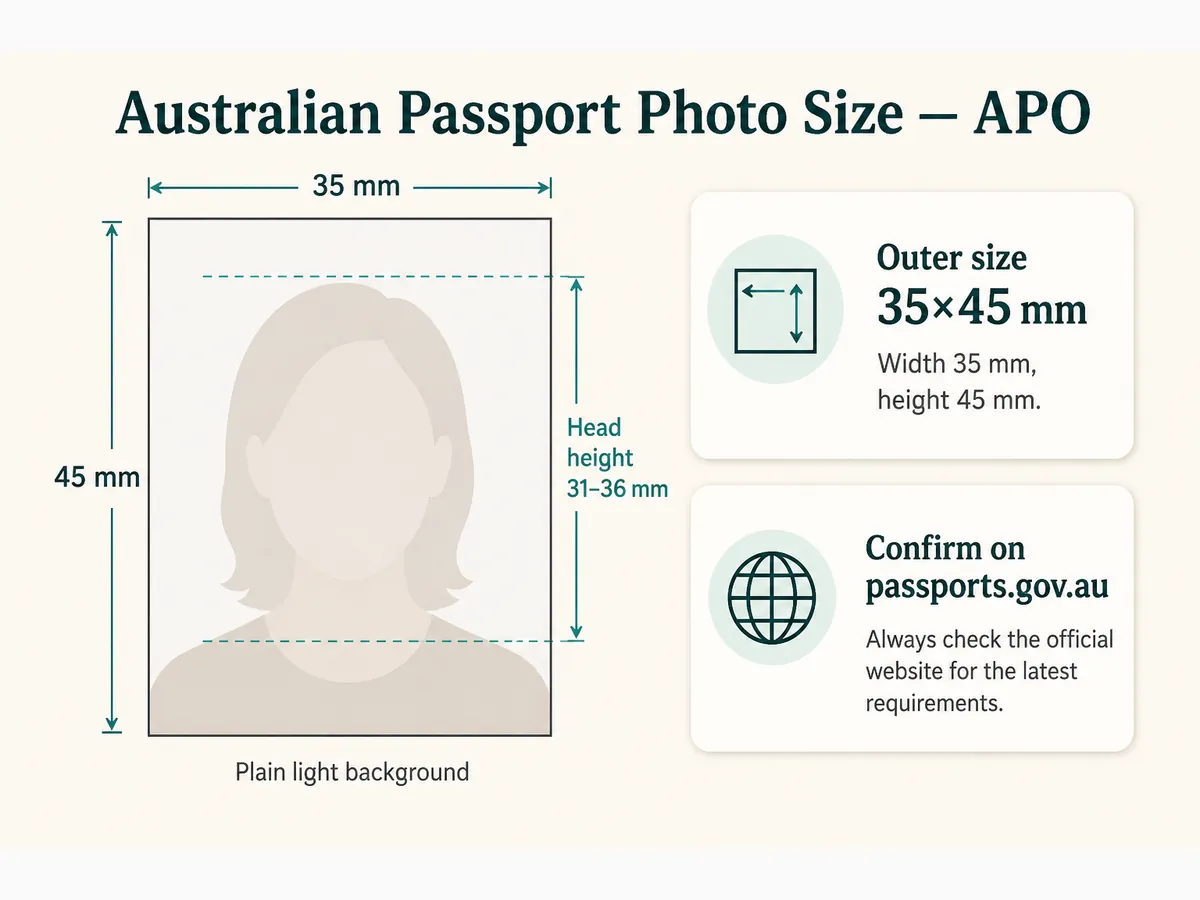
Australian passport photos follow Australian Passport Office (APO) rules on size, white or light grey background, lighting, and expression. Many people shoot at home, crop to an AU 35×45 template, then print two identical copies at Officeworks or Australia Post—or use a digital path when the form allows. This guide is a practical adult home session: gear, lighting for 35×45, pose, crop, and a lodgement checklist. Always confirm live requirements on passports.gov.au.
What you need for an Australian home session
Use a smartphone rear camera or digital camera. Hang a plain white or light grey sheet, or stand against a flat wall in that tone. Patterned wallpaper and outdoor busy scenes fail.
Ask someone else to shoot or use a tripod. Selfies distort head position. Turn off beauty modes, Portrait blur, and AI background swaps.
Confirm whether your application needs printed photos, a digital upload, or both before you leave the session. Rules can differ by form type.
- Plain white or light grey background, evenly lit
- Natural daylight facing a window, or two matched lamps
- Rear camera at eye level—not selfie mode
- No filters, beauty modes, or AI background tools
- Top that contrasts with the wall
Lighting for a clean 35×45 Australian photo
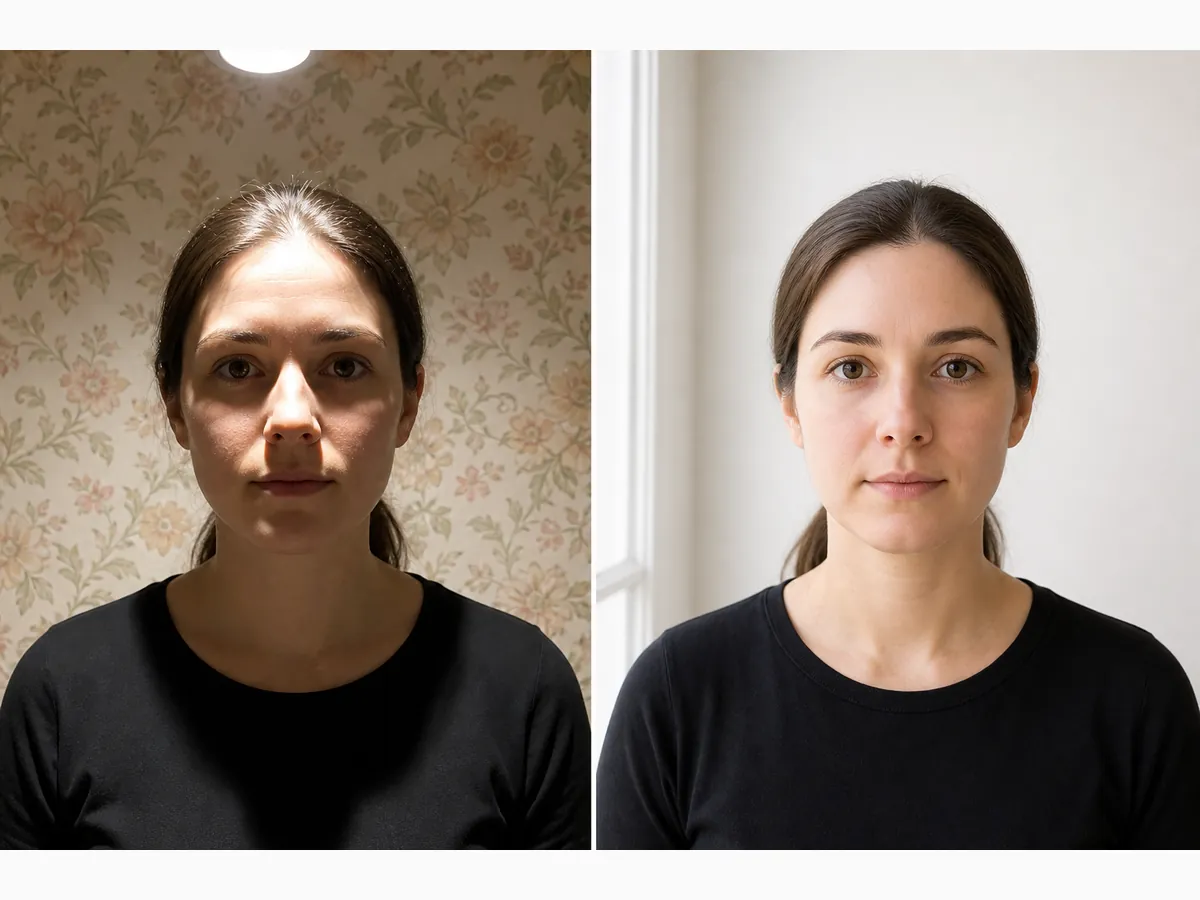
Soft daylight in front of you—or two lamps at face height—beats a single overhead ceiling light. Overhead-only light creates chin shadows and dark patches behind the head.
Stand a short distance from the wall so you do not cast a silhouette. Avoid harsh midday sun outdoors. Indoor even light is easier to control for APO quality.
Watch for glasses glare. If reflections appear, tilt the frames slightly or remove them and retake. Inspect frames at 100% zoom before you crop.
- Even front light; no deep face or wall shadows
- Background stays plain white/light grey under the same light
- Natural skin tone without coloured bulb casts
- No harsh direct flash hot spots
Distance, height, and framing before you shoot
Stand about an arm’s length to a few feet from the background. Include head and upper shoulders so the crop has room to hit APO head-height bands.
Camera at eye level. Looking down or up warps proportions. Leave space above the crown for cropping.
Clean the lens. Take several frames; choose the sharpest with both eyes open and mouth closed.
- Eye-level rear camera
- Space above the head for crop
- Shoulders roughly square to the camera
- Burst of frames; pick the sharpest
Pose, expression, glasses, and clothing
Neutral expression, mouth closed, eyes open and visible. No wide smile—common APO refuse reason. Hair off the eyes.
Glasses only without glare. Head coverings limited to religious or medical reasons with the full face visible from chin to forehead.
Solid everyday clothing that does not blend into the wall. Similar tones hide shoulder edges after crop.
- Neutral, closed-mouth expression
- Eyes clearly visible
- No headphones, filters, or beauty apps
- Clothing contrasts with background
Crop to Australian size and prepare prints
Crop with an Australia 35×45 template—not a US 2×2 tool. Align chin-to-crown with published APO millimetre guidance (commonly discussed as about 32–36 mm on the print).
Our free browser tool helps frame on your device. Cropping cannot fix soft focus or a busy wall—retake those first.
When prints are required, print two identical high-quality copies. Measure a draft before ordering a full Officeworks set. Keep the cropped JPEG until lodgement is accepted.
- AU template; never stretch a US square
- Head height in APO guidance after print
- Two identical prints when required
- Keep original + cropped JPEG
Home shoot vs Officeworks / Australia Post
A careful home photo plus an AU crop and a kiosk sheet is often cheaper than repeat in-store shoots after a refuse. DIY still needs a plain background and even light.
If you lack a clean wall, an Officeworks or AusPost staff shoot may be worth it. If you only need colour-stable prints, shoot at home and print from file.
Say “Australian passport per APO” at any counter so staff do not default to another country’s size.
Australia-specific mistakes to avoid
APO and GOV.UK both use roughly 35×45 outer size, but background tone and head bands differ—always use the Australian template and passports.gov.au text.
- Submitting a US 2×2 square
- Patterned or outdoor busy backgrounds
- Overhead shadows behind the head
- Wide smile or open mouth
- Beauty filters or AI edits
- Hand-trimming without measuring head height
A practical 15-minute AU shoot order
Clear wall → even light → eye-level burst → pick sharp frame → AU crop → draft measure or Officeworks upload.
- Minutes 1–3: plain white/grey sheet; contrasting clothes
- Minutes 4–6: window or two lamps; kill overhead-only light
- Minutes 7–11: eye-level burst of 8–12 frames
- Minutes 12–15: crop; checklist before print/lodge
Pre-lodge Australian home checklist
After you crop to the Australian size, decide whether you need prints, a digital file, or both. Many people upload a 4×6 or 6×4 sheet layout to Officeworks or a similar kiosk, then cut two identical photos. Print at 100% scale on photo paper—never Fit to page.
If your channel asks for a digital upload only, keep one master JPEG and do not let a kiosk auto-enhance a print you will not use. If you need both, derive prints from the same cropped master so the face matches.
Carry a spare print and the original crop until the application is accepted. Humidity and backpack folds ruin edges—use a hard sleeve on lodgement day.
- Recent photo matching current appearance (confirm APO wording)
- Plain white or light grey background; even light
- No shadow under chin or behind the head
- Neutral expression; eyes visible; no heavy edits
- Correct AU crop; prints measured when required
- You rechecked passports.gov.au for your form
Australian home-session checklist
- White or light grey plain background with even light
- Rear camera, eye level, many frames
- Crop to current APO millimetre size with head guides
- No toys, hands, patterned blankets, or filters
- Print on photo paper at 100% or upload the correct digital file
- Measure the cut print with a ruler before you lodge
Ready to crop your photo?
Free online tool—pick your country template (US 2×2 or UK 35×45), align your head, and download. No account needed.