
Take a UK passport photo at home without a booth
You can take a UK passport photo at home for many GOV.UK applications when composition, cream or light grey background, lighting, and expression meet official rules. UK photos are 35×45 mm rectangles—not US 2×2 squares—and printed guidance often expects cream/light grey rather than bright American white. This guide is a practical home session for adults: gear, lighting that passes automated checks, framing for 35×45, crop, and online vs paper paths. Always re-check gov.uk before you upload or post.
What you need for a UK home session
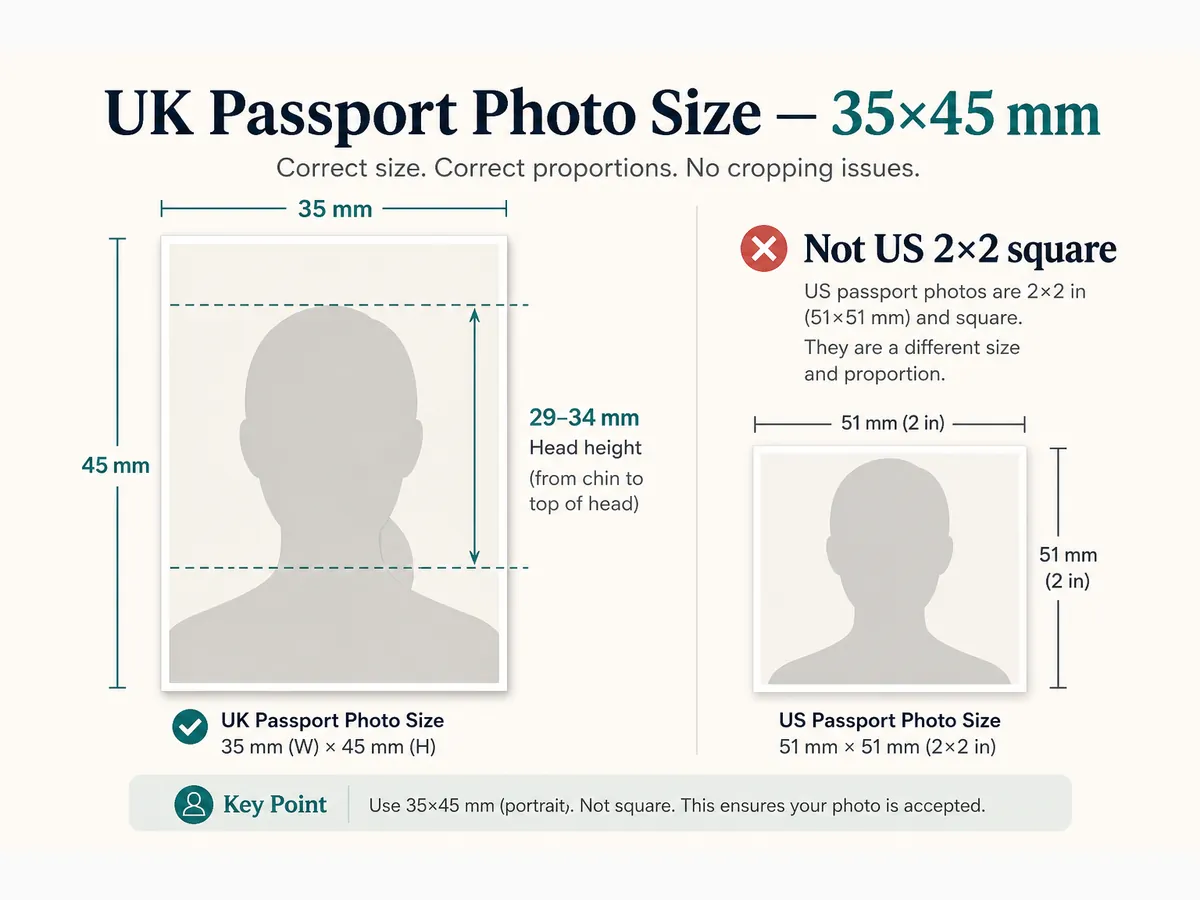
Use a smartphone rear camera or digital camera. Hang a plain cream or light grey sheet—or stand against a flat light wall in that tone. Avoid bright pure-white US-style walls for paper prints when GOV.UK asks for cream/light grey.
Ask someone else to shoot or use a tripod with a timer. Front-camera selfies often fail from angle and facial distortion. Turn off beauty modes, Portrait blur, and AI background swaps.
Know your path before you shoot: online GOV.UK needs a digital file that passes photo check; paper routes need professional-standard prints. The visual rules overlap, but deliverables differ.
- Plain cream or light grey background, evenly lit
- Natural daylight facing a window, or two matched lamps
- Rear camera at eye level—not selfie mode
- No filters, beauty modes, or AI background tools
- Contrasting everyday top (not white-on-cream)
Lighting that passes GOV.UK checks
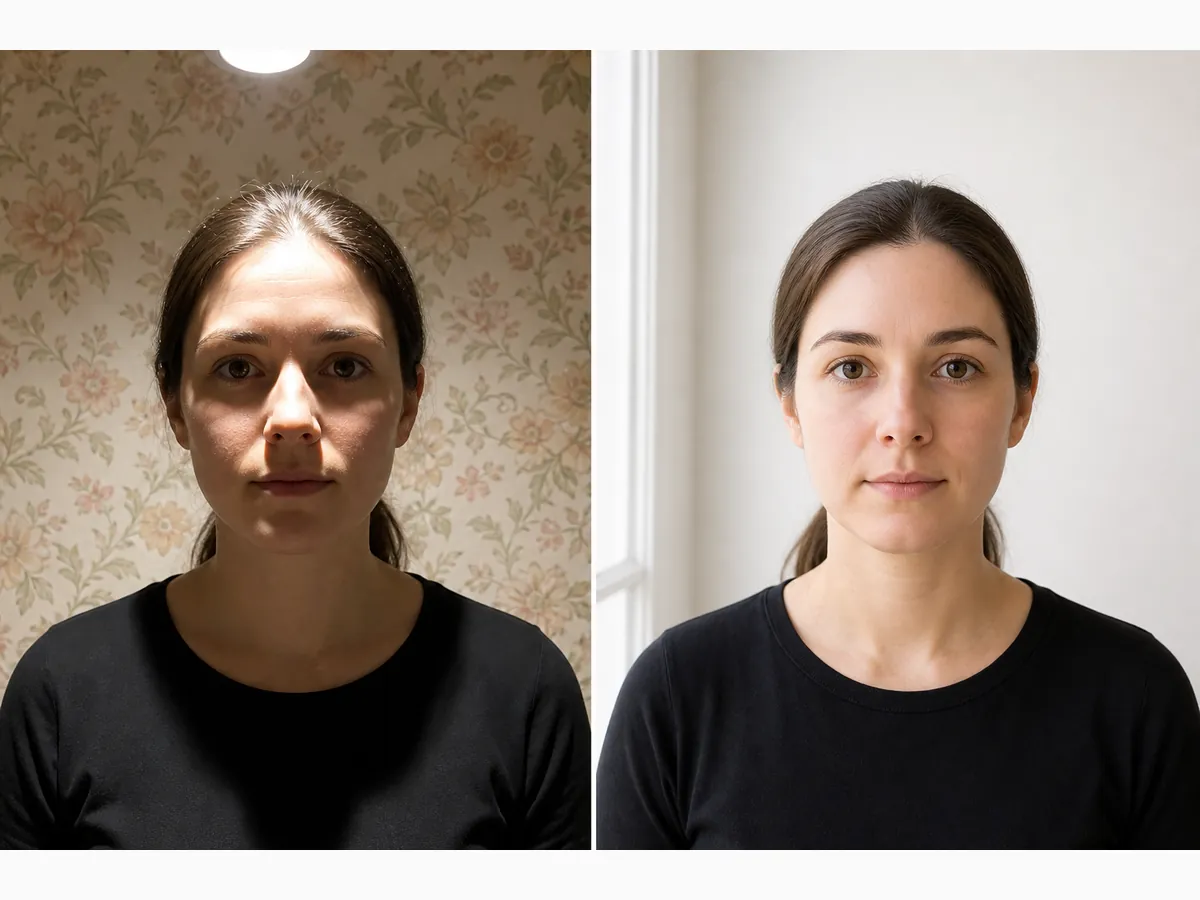
Evenness beats brightness. Soft daylight in front of you—or two household lamps at face height—works better than a single ceiling light. Overhead-only lighting carves chin shadows and dark ovals on the wall behind the head.
Stand a short distance from the background so your head does not cast a silhouette. Do not put a bright window directly behind you. Recheck for shadows after every lighting change—automated GOV.UK checks are sensitive to background unevenness.
Skip harsh on-camera flash that creates hot spots or glasses glare. If you must use flash, bounce or diffuse it and inspect the frame at 100% zoom.
- Face soft window light or matched side lamps
- No strong shadow under the chin or behind the head
- Background stays uniform cream/light grey under the same light
- Natural skin tone—no heavy colour cast from coloured bulbs
Distance, height, and 35×45 framing
Stand roughly an arm’s length to a few feet from the wall. Too close shows sheet wrinkles; too far makes the head tiny after crop.
Keep the camera at eye height. Looking down shortens the face; looking up exaggerates the chin. Include head and upper shoulders—digital GOV.UK photos expect more than a tight face crop.
Leave space above the crown so you can fine-tune the crop. Take a burst of frames; pick the sharpest with both eyes open.
- Camera at eye level
- A little space above the head for cropping
- Shoulders in frame for digital applications
- Rear camera + helper/tripod preferred
Pose, expression, glasses, and clothing
Face the camera squarely with a neutral expression and mouth closed. Eyes open and clearly visible; move hair off the eyes. Shoulders square so both sides of the face show.
Glasses must not hide the eyes or show flash reflections—common GOV.UK fail reasons. Hats and head coverings only for religious or medical reasons with the full face from chin to forehead visible.
Wear a solid top that contrasts slightly with cream/grey. Pure white on cream flattens shoulder edges in a tight 35×45 crop.
- Neutral expression, mouth closed, eyes open
- No headphones, filters, or beauty apps
- Glasses without glare when worn
- Clothing contrasts with the background
Crop to UK 35×45 and check head height
Crop to a 35:45 aspect with head guides. On a printed photo, crown-to-chin should measure 29–34 mm. Freehand zoom in a generic editor often drifts—use a UK template.
Our free browser tool applies a UK template on your device before download. Cropping cannot fix a soft original, selfie angle, or patterned wall—retake those first.
For online upload, export within published pixel and file-size limits on the GOV.UK digital photo-rules page. For paper routes, print two identical copies at true millimetre size.
- Lock 35:45 aspect; do not stretch a US square
- Align crown-to-chin inside the 29–34 mm guide
- Retake soft or shadow-heavy originals
- Keep uncropped original + cropped JPEG
Online GOV.UK photo check vs paper prints
Automated online checks look at face position, background, and quality. A photo that looks fine in your gallery can still fail if the face fills too much of the frame or the background is uneven.
If the check fails twice on the same issue, change the setup—do not keep uploading minor edits of a flawed original. Beauty filters and AI edits are not allowed.
Paper applications need professional-quality prints. Home inkjet may not meet biometric clarity—many people print at Tesco, Boots, or a booth after a successful digital crop. Confirm current GOV.UK notes for your form.
UK-specific mistakes US DIY guides miss
UK and US home-photo advice is not interchangeable. Fix background tone and rectangle framing before you obsess over millimetres.
- Using a bright US white wall when cream/light grey is expected for prints
- Submitting a US 2×2 square crop to GOV.UK
- Head height outside 29–34 mm on prints
- Selfie angle and front-camera distortion
- Overhead-only lighting with wall shadows
- Filters, Portrait blur, or AI background swaps
A practical 15-minute UK shoot order
Clear background → set even light → lock eye-level camera → shoot a burst → pick sharp frame → UK crop → run photo check or measure a draft print.
- Minutes 1–3: hang cream/grey sheet; change into contrasting clothes
- Minutes 4–6: window or two lamps; kill harsh overhead-only light
- Minutes 7–11: eye-level burst of 8–12 frames
- Minutes 12–15: crop to 35×45; checklist before upload/print
Pre-submit UK home checklist
If any item fails, retake while the setup is still ready. Fixing a rejected UK photo usually costs more calendar time than one careful session.
- Recent photo that looks like you now (confirm GOV.UK recency)
- Plain cream/light grey (prints) or plain light digital background
- No shadow under chin or behind the head
- Neutral expression; eyes visible; no heavy edits
- Correct 35×45 crop; head band in range for prints
- You rechecked gov.uk for your application type
Ready to crop your photo?
Free online tool—pick your country template (US 2×2 or UK 35×45), align your head, and download. No account needed.