My Number Card photo tips for smartphone upload
My Number Card (マイナンバーカード) applications ask for a facial photo that meets portal rules—often taken with a smartphone. Size and face-area guidance can differ from passport 35×45 mm or résumé paste-on prints. Use this page as a practical checklist, then confirm the current official My Number / municipal instructions before you upload.
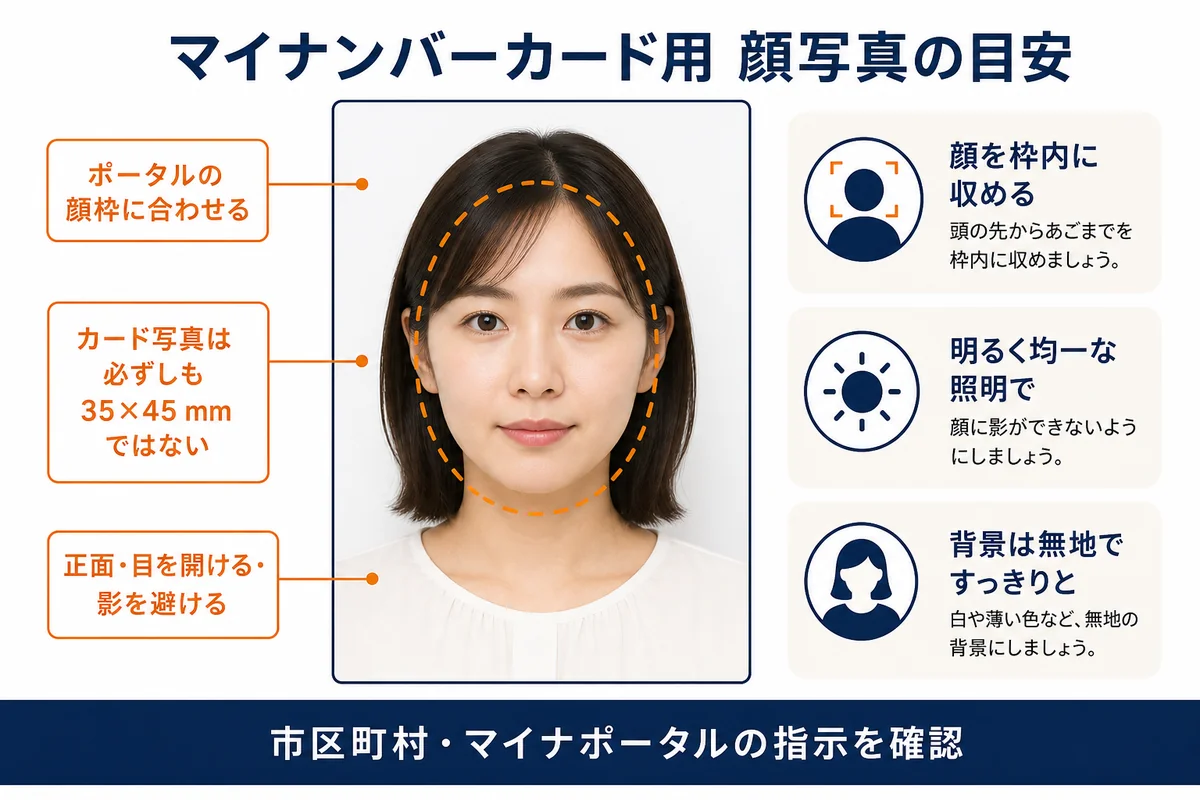
Confirm municipal / My Number portal instructions for your application
My Number photo checks focus on a recognisable, unobstructed face suitable for an identity card—not a fashion portrait.
Follow the on-screen guide in the official application flow for how much of the frame your face should occupy. Do not invent pixel limits here—use the portal’s own meter.
A passport JPEG is not automatically valid. Re-check framing after any crop, and keep accessories from hiding the face oval.
| Specification | Official requirement |
|---|---|
| Delivery | Digital file via official portal / app path |
| Background | Plain light; even lighting |
| Face | Clear, front-facing, eyes visible |
| Expression | Neutral; mouth closed |
| Edits | No beauty filters or face reshape |
Always confirm the latest rules on the official government site before you submit.
Cream or textured walls, wrong head size after a selfie, and beauty filters cause most delays.
- Shoot in daylight facing a plain wall.
- Use the rear camera at eye level when possible.
- Remove filters before export.
- If the portal rejects the file, adjust framing first—not just compression.
Make your passport photo now
Crop to the official size in your browser, then download to upload or print.
Works on phone or desktop. No app download.
Can I print my own passport photo at home?
Will a home-printed photo be accepted?
What size should I print?
- • Follow the official face-size guide in the application UI
- • Plain light background without shadows or patterns
- • Front-facing pose; head not tilted
- • Eyes open and clearly visible
- • Neutral expression; natural skin tone
- • No hats or coverings unless an allowed exception applies
- • No filters that change facial geometry
- • Only the applicant visible
- • Uploading an uncropped group photo
- • Strong backlight or ceiling shadow
- • Beauty mode that alters face shape
- • Glasses glare hiding the eyes
- • Using an old passport scan that fails face-area checks
Same size as passport 35×45?
Not necessarily. Follow the My Number application guide for face area and file rules.
Smartphone allowed?
Yes—many applicants use a phone. Meet lighting and framing rules.
Can I use a booth photo?
If the file meets portal checks, yes. Re-check framing after any transfer.
Filters OK?
No. Avoid beauty modes and face reshaping.
Glasses?
Eyes must be clearly visible without glare—removing glasses is safer when unsure.
Children?
Each card needs that person’s own photo. Follow child-specific portal notes.
Background?
Plain light background; avoid patterns and shadows.
Where to confirm officially?
Use the official My Number Card information and your municipality’s application flow.