Japan photo sizes for passport, resume, and My Number
Need a photo for a Japanese passport, a résumé (履歴書), or a My Number Card? The millimetres are not the same: passports are often 35×45 mm, many résumés use about 30×40 mm, and My Number follows the portal’s face guide. Choose your document below, crop free in the browser, then confirm the latest official checklist before you apply.
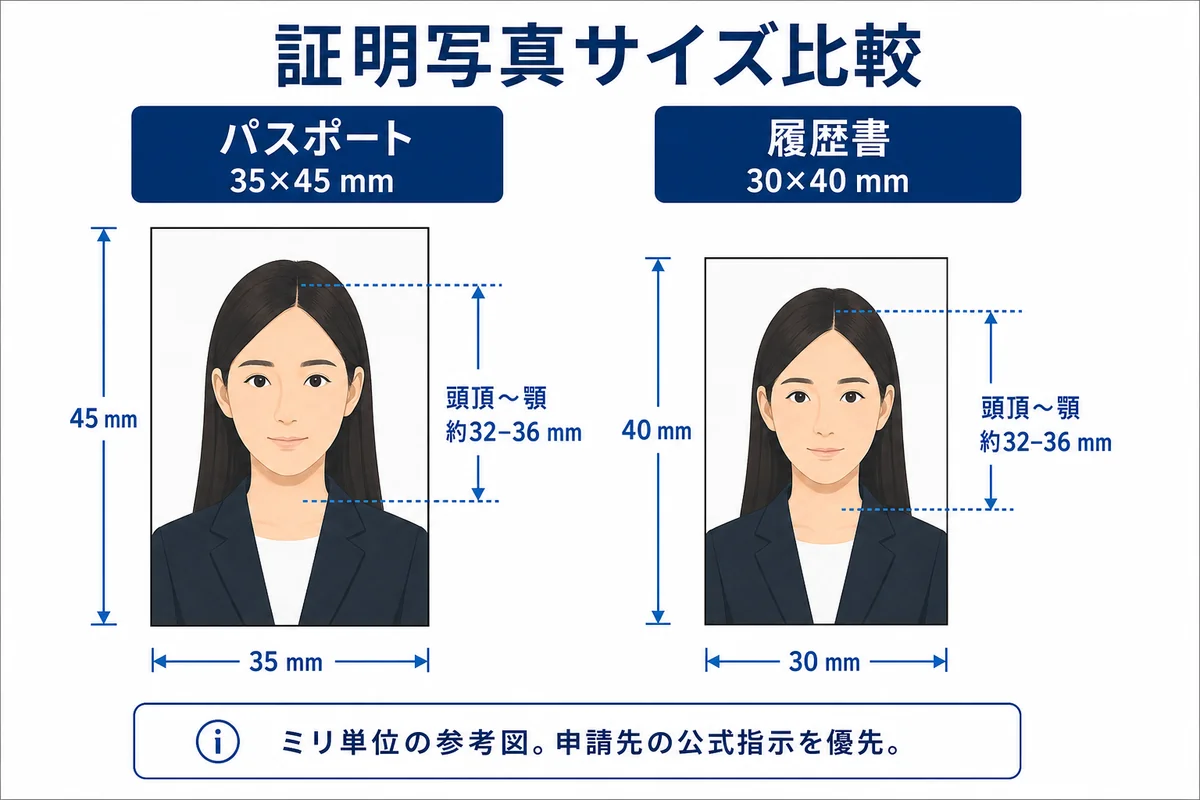
Illustrative guide—confirm MOFA, municipal, or portal instructions for your case
A passport photo, a résumé paste-on, and a My Number upload all need a clear face on a plain background—but the outer size and head framing differ. Pick the correct template first so you do not stretch one crop into another.
Passport books and many consular checklists use 35×45 mm. Résumé paste-on photos are often 30 mm wide × 40 mm tall. Re-crop when the document changes; do not stretch.
Online passport applications and My Number portals usually want a clean JPEG or data file, not only a booth print. This tool helps you crop; you still submit on the official site.
Photo booths and convenience-store prints are still common. A smartphone photo can work when light, background, expression, and size match the published rules—double-check before you apply.
| Specification | Official requirement |
|---|---|
| Passport (旅券) | 35 × 45 mm (common) |
| Résumé (履歴書) | Often 30 × 40 mm |
| My Number Card | Follow portal size / face rules |
| Background | Plain light colour, even light |
| Recency | Typically within 6 months |
Always confirm the latest rules on the official government site before you submit.
Cream or textured walls, wrong head size after a selfie, and beauty filters cause most delays.
- Choose the size for your document type first—do not reuse another country’s “passport” preset.
- Passport 35×45 ≠ résumé 30×40—re-crop instead of stretching.
- For online filing, export a sharp JPEG and keep a print twin if the office still wants paper.
- Confirm head-height diagrams on the official checklist for your prefecture or portal.
Make your passport photo now
Crop to the official size in your browser, then download to upload or print.
Works on phone or desktop. No app download.
Can I print my own passport photo at home?
Will a home-printed photo be accepted?
What size should I print?
- • Match the exact millimetres for your document type
- • Plain light background with even lighting and no shadows
- • Neutral expression, mouth closed, eyes open and visible
- • Recent likeness (often within about six months)
- • No beauty filters, face reshaping, or heavy retouching
- • One person only; nothing covering the face oval
- • Using a résumé 30×40 crop for a 35×45 passport
- • Busy wallpaper or convenience-store poster backgrounds
- • Smiling with teeth or tilted selfie angles
- • Tinted glasses or glare that hides the eyes
- • Assuming a booth JPEG automatically meets portal file limits
Are passport and résumé photos the same size in Japan?
Usually no. Passports are often 35×45 mm; many résumé forms use about 30×40 mm. Always follow the form or checklist for your case.
What size is a Japan passport photo?
Commonly 35×45 mm. Follow the official head-height diagram for your application.
What size for a résumé photo?
Many 履歴書 forms use about 30×40 mm. Check your form; do not reuse a passport crop without re-framing.
Can I take the photo with a smartphone?
Yes if lighting, background, expression, and size rules are met. Many people still use booths for convenience.
Do online passport applications need a data file?
Online paths typically need a digital photo that passes automated checks—confirm format limits on the official portal.
My Number Card photo tips?
Follow the My Number portal guidance for face size and background. Rules can differ from résumé paste-on photos.
White background required?
Plain light backgrounds are standard. Avoid patterns, shadows, and coloured studio muslins unless your checklist allows them.
Where is the official passport guidance?
Start with the Ministry of Foreign Affairs passport pages and your application channel’s photo checklist.