Prepare a 2×2 photo for your US visa application
Most US nonimmigrant visa photos use the same 2×2 inch square as a US passport photo. You usually upload a JPEG in the online application (such as DS-160 / CEAC). Composition rules follow U.S. Department of State visa photo guidance.
| Specification | Official requirement |
|---|---|
| Photo size | 2 × 2 inches (51 × 51 mm), square |
| Head height | 1 to 1⅜ inches (25–35 mm), chin to top of head |
| Photo age | Taken within the last 6 months |
| Background | Plain white or off-white |
| Typical submission | Digital JPEG upload (some posts also ask for prints) |
Always confirm the latest rules on the official government site before you submit.
Cream or textured walls, wrong head size after a selfie, and beauty filters cause most delays.
- Crop to a true square before you upload. A phone selfie with uneven margins often fails automatic checks.
- Use a plain white or off-white wall. Cream, textured, or busy backgrounds cause delays even when the size is right.
- Keep a neutral expression with your mouth closed. Filters and AI background tools are a common rejection reason.
- Glasses usually fail because of glare. Retake without them unless you have an allowed medical exception.
Make your passport photo now
Crop to the official size in your browser, then download to upload or print.
Works on phone or desktop. No app download.
What a compliant US visa photo looks like
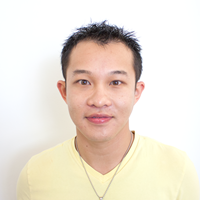
What works in this photo
- • Sharp focus and natural color
- • Even lighting with no heavy shadows on the face
- • Neutral expression, eyes open, looking at the camera
- • Plain white or off-white background
- • Head height within the 1 to 1⅜ inch range after cropping
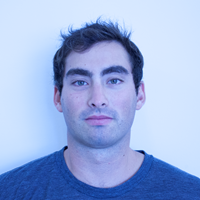
Why this often fails
- • Blue or yellow color cast from poor white balance
- • Unnatural skin tone that does not match a recent likeness
- • Can delay or reject the online photo check
How to fix it
- • Retake in daylight or even indoor light facing you
- • Avoid strong colored lamps behind or beside you
- • Prefer a clean retake over heavy color correction apps
Upload checklist
- • Color photo, recent likeness (within 6 months)
- • Square 2×2 inch composition after cropping
- • JPEG (or the format your form lists)
- • No heavy filters, beauty apps, or AI background swaps
- • Face clearly visible; no hats unless for religious or medical reasons
If a consulate asks for printed photos
Some posts still want physical prints for the interview packet. Size stays 2×2 inches.
- • Print on quality photo paper (matte or glossy)
- • Keep prints identical if more than one copy is required
- • No creases, staples, or writing on the front
- • Only the child should appear in the photo
- • Eyes open when possible; lying-down shots are allowed for infants
- • No toys, pacifiers, or supporting hands in view
- • Crop to the same head-size range after shooting
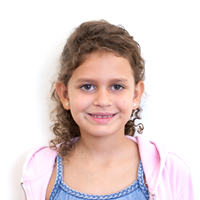
Example of a child photo that meets the square 2×2 framing
Is a US visa photo the same size as a passport photo?
Yes. Both use a 2×2 inch (51×51 mm) square with the same head-size range. The difference is usually how you submit the file or prints.
Can I take my own US visa photo at home?
Yes, if the photo meets size, background, lighting, and expression rules. Crop to 2×2 with head guides before you upload.
What size should my US visa picture be?
2×2 inches square. After cropping, the head (chin to top of hair) should measure about 1 to 1⅜ inches.
Do I upload a digital file or bring prints?
Most online visa applications ask for a digital JPEG. Some consulates also want printed 2×2 photos for the interview—follow the instructions in your appointment letter.
Can I smile in a US visa photo?
Keep a neutral expression with your mouth closed. A wide smile showing teeth is usually rejected.
Can I wear glasses?
Generally no, because glare causes rejections. Glasses are only allowed with an approved medical exception.
What about baby visa photos?
Use the same 2×2 size. Lay the baby on a plain white sheet, shoot from above, and keep toys and other people out of the frame.
Why was my visa photo rejected?
Common reasons are wrong crop, shadows, busy background, glasses glare, or heavy editing. Retake a clean photo instead of repeatedly editing a failed file.